Effective Email Marketing Strategies for Events

Effective Email Marketing Strategies for Events: How to Maximize Engagement and Attendance
Email for events is a focused tool to drive RSVPs, increase turnout, and move prospects from invite to post-event conversion. This guide breaks down practical tactics that lift open rates, clicks, and registrations by syncing timing, copy, design, and segmentation with attendee intent. You’ll find clear best practices for invitations, personalization tactics that boost engagement, automation workflows that convert, and post-event follow-ups that turn attendees into qualified leads. Each H2 section includes real examples, quick-check tables, and template guidance so you can implement an email strategy that measurably improves RSVPs and attendance. We also show how targeted automation and managed template services support lead-gen without distracting from the core tactics.
What Are the Best Practices for Event Email Marketing?

Event email marketing works when timing, clarity, and relevance remove friction and drive action. Short, benefit-led messages with a single clear CTA convert better because they remove guesswork and guide recipients to register. Use a predictable cadence for invites and reminders, write subject lines that set expectations, design for mobile first, and A/B test to improve deliverability and CTR. Together these practices lift RSVP conversion by aligning messages with how people behave and which platforms they use. The examples and checklist below make these practices simple to apply and iterate on.
Event email best practices at a glance:
- Optimal Cadence: Send the initial invite 3–4 weeks before, a reminder 1–2 weeks out, and a last-chance message 24–48 hours prior.
- Subject + Preheader: Lead with the key benefit and a time/location cue to boost opens.
- Single Clear CTA: Place one primary registration link above the fold and repeat it once below.
- Mobile-First Design: Ensure CTAs are tappable and hierarchy reads well on small screens.
- Segmentation & Relevance: Target by interest, past attendance, or geography.
- Deliverability & Compliance: Authenticate your sending domain and respect opt-outs.
These basics give you a framework to test and optimize, which leads naturally into crafting the invitation itself for maximum impact.
Different email elements need distinct approaches; the table below maps subject lines, preheaders, and CTA placement to recommended values for events.
| Email Element | Best Practice | Recommended Value |
|---|---|---|
| Subject line | Convey benefit + urgency | 40–60 characters; action or value first |
| Preheader text | Support the subject with a detail | 35–90 characters; include location or key benefit |
| CTA placement | Make the primary action visible early | One primary CTA above the fold; repeat once below |
| Visual hierarchy | Lead with title, date, CTA | Single-column layout, 1–2 images max |
How to Craft Compelling Event Invitation Emails
A strong invitation tells recipients what the event is, why it matters to them, and exactly how to RSVP — all in one focused message. Open with a short headline that states the main benefit, follow with a one-sentence value proposition, and place a prominent registration CTA near the top. Use the sample subject lines and body example below to model tone and structure, then run through a short checklist for design and accessibility before you send.
Sample subject lines and preheaders to test:
- Subject: “Meet industry leaders on May 15 — Reserve your seat” — Preheader: “Free workshop + networking — limited spots.”
- Subject: “Exclusive VIP roundtable: Strategy & insights” — Preheader: “Apply for a limited invitation.”
- Subject: “Webinar: Increase conversions with fewer ads” — Preheader: “Register now for practical tactics.”
Invitation body example: Start with a bold one-line benefit, add two short supporting sentences that explain what attendees will gain, and finish with a clear CTA like “Save my seat” linking to the registration page. Keep the copy tight so the CTA does the conversion work; next, we’ll cover personalization tactics that amplify these effects.
Which Personalization Techniques Boost Event Email Performance?
Personalization raises relevance by matching content to recipient attributes or past behavior, which increases opens and clicks because messages feel tailored and timely. Use tokens (first name, company), behavioral triggers (past attendance, resource downloads), and geotargeting to customize subject lines and CTAs. Dynamic content blocks can display session suggestions or speaker highlights based on interests. Start with a few high-impact fields — name, past attendance, interest tags — and expand as your data gets cleaner.
Personalization tactics to implement:
- Use first-name tokens sparingly in subject lines to build familiarity without sounding generic.
- Customize CTAs by segment (e.g., “Reserve VIP seat” for high-value prospects).
- Recommend sessions based on prior behavior or declared interests.
How Can Email Marketing Automation Enhance Event Promotion?
Automation lets you run timely sequences that capture intent, cut manual work, and shepherd prospects from invite to attendance with triggers and prebuilt messages. Invite sequences, reminders, confirmations, and pre-event prep messages keep communication consistent without manual intervention and improve RSVP and show rates. The table below summarizes common workflows with their triggers, timing, and purpose so teams can map automation to measurable outcomes.
Below is a concise automation workflow map showing triggers and timing for typical event campaigns.
| Workflow | Trigger | Timing & Purpose |
|---|---|---|
| Invite Sequence | Email opt-in / campaign start | 3–4 emails over 3–4 weeks to inform and convert |
| Reminder Series | Registered but not attended | 7 days, 3 days, 24 hours prior to boost attendance |
| Last-Chance | Low-registration threshold or time limit | 48–24 hours before to create urgency |
| Confirmation + Prep | On registration | Immediate confirmation + logistics 1 week prior |
If you prefer managed automation, Let’s Groove Events can design and run RSVP and nurture sequences aligned with your lead-gen goals — handling triggers, messaging, and tracking so your team focuses on content and conversions. This setup turns automated touchpoints into measurable lead outcomes and prepares the ground for post-event follow-up.
What Are Effective Automation Workflows for Event Campaigns?
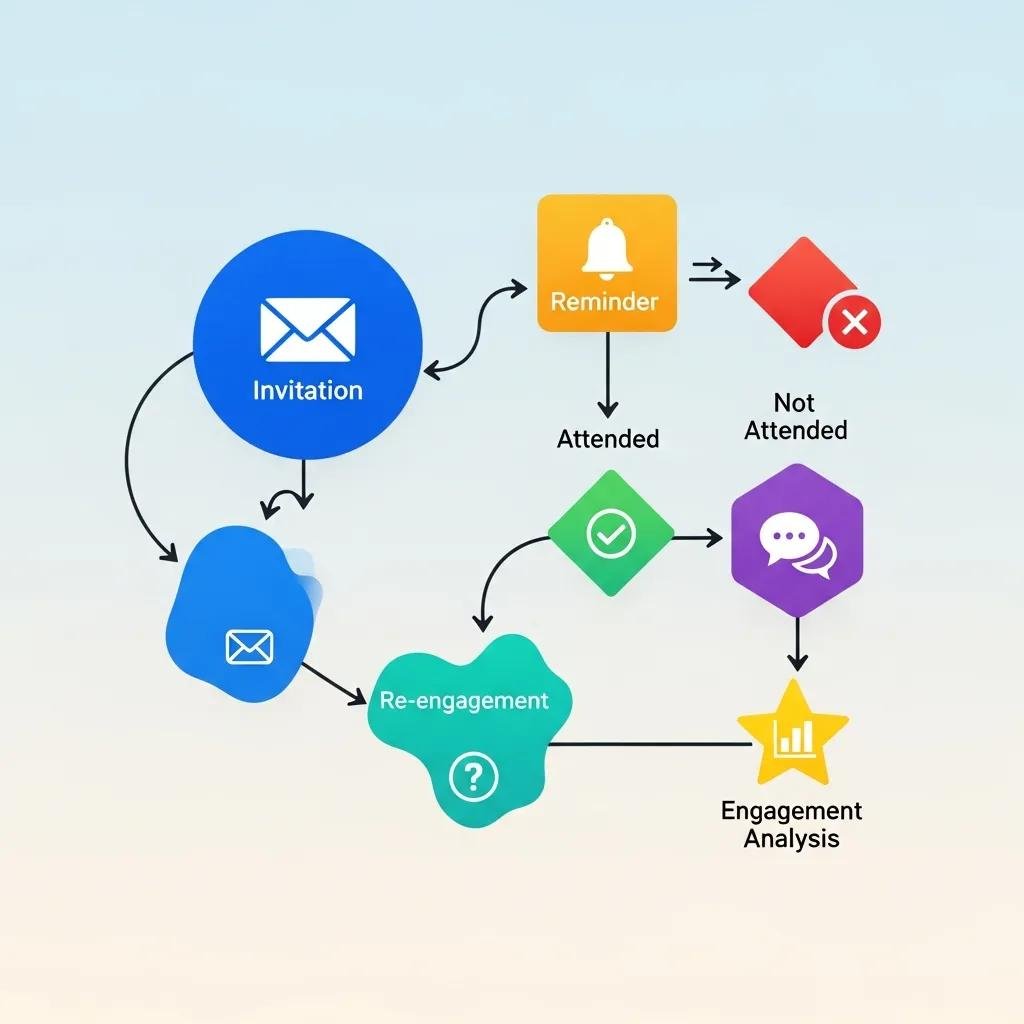
Good automation maps to attendee behavior and lifecycle stage, turning signals into timely messages that nudge conversion. Well-designed sequences increase registrations and lower no-shows by delivering relevant content at predictable intervals. Key flows include RSVP nurture for new leads, reminder and last-chance series for registrants, and re-engagement for non-responders. Each should have defined triggers, a tight cadence, and a clear KPI like RSVP conversion or attendance rate.
Example RSVP nurture sequence: Send the initial invite, follow with a benefits-focused reminder after 3–5 days, and send a deadline-driven message 48 hours before the event. Measure conversion at each step and refine copy and timing accordingly. This keeps messages aligned with intent and reduces manual follow-up while producing measurable results that feed post-event conversion efforts.
How to Segment Your Audience for Targeted Event Emails
Segmentation makes emails more relevant by matching messages to a recipient’s relationship with your brand and their likely reasons to attend. Use demographics, behavior, interests, or engagement level. Practical segments include past attendees, VIP/high-value prospects, local clusters near the event, and low-engagement leads. Tailor messaging for each: VIPs get exclusive perks, locals get logistics and networking details, and cold leads see concise, high-value offers.
Segment examples and messaging guidance:
- Past attendees: Highlight continuity and offer early access.
- Geographic segments: Call out local logistics and in-person benefits.
- Low-engagement leads: Send short, high-value invites with strong social proof.
Segmented campaigns feed automation logic and improve ROI by sending the right message to the right audience at the right time — supporting conversion and lead-generation KPIs directly.
What Are Key Components of a Successful Post-Event Email Strategy?
A focused post-event strategy extends ROI by turning attendees into leads through timely thank-yous, content recaps, feedback requests, and conversion offers. Each follow-up has a specific goal and KPI — for example, engagement, lead qualification, or bookings. Sequence these messages (immediate thank-you, resource delivery, targeted offers) to keep attendees engaged and capture data that guides sales outreach. The table below maps follow-up types to goals and suggested KPIs so you can prioritize the highest-impact messages.
| Follow-up Type | Goal | KPI / Template Summary |
|---|---|---|
| Thank-you email | Reinforce the relationship | Open rate, clicks to resources; short thank-you + link |
| Content recap | Deliver value & nurture | Click-through to recordings; measure engagement time |
| Feedback/survey | Improve future events | Response rate; NPS or satisfaction score |
| Conversion offer | Drive bookings / consultations | Conversion rate to demo/booking; limited-time CTA |
Mapping follow-ups to KPIs clarifies which messages generate revenue-related outcomes and which guide program improvements. Below is a simple follow-up sequence you can use right away.
How to Use Follow-Up Emails to Increase Event Impact
Follow-ups turn short-term interest into ongoing engagement by delivering value and clear next steps. A tight, three-email sequence often works best: an immediate thank-you with key resources, a recap with highlights and recordings two to three days later, and a conversion offer with a time-limited incentive about one week after the event. Use different CTAs depending on your conversion goal — content engagement, demo requests, or bookings.
Template example: “Thanks for attending [Event]. Here’s the recording and the top takeaways. If you’d like a personalized demo or follow-up meeting, schedule a time within the next 7 days.” This prioritizes value first, then asks for commitment, which improves conversion rates and lead quality for outreach teams.
Which Metrics Should You Track After Event Email Campaigns?
Post-event success depends on tracking the right metrics so you can connect email activity to attendance and revenue. Core KPIs are open rate, click‑through rate (CTR), RSVP-to-registration conversion, attendance rate, and post-event conversion to qualified leads or bookings. Benchmarks differ by industry, so focus on improvement trends and lift from A/B tests. Attribute conversions back to campaign touchpoints and prioritize segments that show the strongest post-event conversion for sales follow-up.
Key metrics to monitor and benchmark:
- Open Rate: Shows subject-line effectiveness and deliverability.
- CTR: Measures interest in event content and CTA clarity.
- RSVP Conversion: Percentage of recipients who register after clicking.
- Attendance Rate: Registrants who actually attend — critical for ROI.
- Post-event Conversion: Attendees who become qualified leads or bookings.
Reviewing these KPIs reveals which messages and segments drive real business outcomes and informs iterative improvements to your event email playbook.
Where Can You Find and How to Use Event Invitation Email Templates?
Templates speed execution and enforce a proven visual hierarchy and CTA placement that drive RSVPs — but they only work if you customize them for your audience and event type. Look in ESP libraries, design marketplaces, or agency template collections. Prioritize single-column, mobile-friendly templates with clear CTAs and modular blocks for easy personalization. Below are common sources and quick tips for adapting templates to different event formats.
Template sources and how to use them:
- ESP libraries: Fast, integrated with your sending platform and analytics.
- Design marketplaces: Better visuals and layout variety.
- Agency/managed templates: Customizable and tied to lead-gen goals.
Start with a template, swap the hero image, tailor copy for each segment, and point buttons to tracked registration pages. Managed template services can further optimize conversion by A/B testing subject lines and CTAs.
For professional, customizable templates and managed services that help secure RSVPs and bookings, Let’s Groove Events offers template design and implementation aligned with lead-generation goals and conversion tracking.
What Elements Should Effective Invitation Templates Include?
High-performing invitation templates include a clear event title and date, a concise value statement, a prominent RSVP CTA, registration or logistics links, and social proof where relevant. Design hierarchy should put a high-contrast CTA near the top, with accessible supporting text below. Include timezone info and a short agenda to remove doubts and increase registration confidence.
Checklist of must-have elements:
- Clear event title, date/time, and timezone.
- One primary CTA button above the fold with a supportive link.
- Brief agenda or key takeaways that show value.
- Accessibility features: alt text, readable fonts, and sufficient contrast.
These elements help templates perform consistently across segments and devices and support the measurable goals we covered earlier.
How to Customize Templates for Different Event Types
Customize templates so tone, imagery, and CTA mechanics match the event’s purpose and audience expectations — that’s what improves relevance and conversion. Weddings and private parties favor warm imagery and RSVP-only flows; corporate events call for professional imagery, an agenda link, and registration/ticket CTAs. Adjust tone, button text, and follow-up sequences to match the desired conversion: ticket purchase, application, or limited-seat RSVP.
Customization tips by event type:
- Weddings/private parties: Use emotive imagery, RSVP-only CTAs, and concise logistics.
- Corporate events: Highlight speakers, agenda, and registration or ticket purchase.
- Fundraisers: Lead with mission impact, suggested donation or ticket CTA, and social proof.
Adapting templates to event type ensures your messages resonate and encourage the right action.
Frequently Asked Questions
What are the key benefits of using email marketing for events?
Email gives you a direct, measurable channel to reach potential attendees. It’s highly targetable and personalizable, so you can boost RSVPs, improve attendance, and nurture relationships before, during, and after the event. With clear metrics, you can refine your approach and generate leads for future programs.
How can I improve the open rates of my event emails?
Focus on subject lines that promise value and a clear time cue, keep them concise, and test variants. Personalization and audience segmentation make messages more relevant. Also experiment with send times and make sure your sending domain is authenticated to avoid deliverability issues.
What role does A/B testing play in email marketing for events?
A/B testing lets you compare subject lines, layouts, CTAs, or send times to see what performs best. It’s an iterative way to improve opens, clicks, and registrations — and to learn which segments respond to which messages.
How can I effectively follow up with attendees after an event?
Start with a prompt thank-you that includes key resources, follow with a recap and recordings, then send a targeted offer or survey. Stagger those messages over the first week to keep momentum and capture engagement that can be passed to sales.
What are some common mistakes to avoid in event email marketing?
Avoid ignoring mobile optimization, sending messages too late, and skipping segmentation. Don’t over-personalize with poor data, and keep CTAs focused — multiple competing actions reduce conversions. Plan your cadence and test before large sends.
How can I measure the success of my event email campaigns?
Track open rates, CTR, RSVP conversion, actual attendance, and post-event conversion to leads or bookings. Look at trends and A/B lift rather than single benchmarks, and attribute conversions back to the emails that influenced them.
Supercharge Event Engagement with Strategic Email Marketing
Well-executed email marketing can meaningfully boost engagement and attendance when you combine smart timing, personal relevance, and automation. Use the best practices here to craft invitations that convert, automate the right touchpoints, and follow up to turn attendees into leads. If you want ready-made templates or managed automation that align with your lead-gen goals, we can help you put these tactics into production — and measure the results. Start turning your event emails into predictable drivers of attendance and pipeline today.